Subscribe For Free Updates!

We'll not spam mate! We promise.

Showing posts with label virus. Show all posts

May 2, 2008

What you need to know about computer viruses and anti virus software protection

What Is a Computer Virus?

Like viruses that infect living beings, computer viruses infect your computer. They are software, and are often attached to other software or documents you might receive. When you run the virus's software or the file the virus has infected, the virus can infect your computer's software.

There are many types of viruses and terms for them, but we'll use the general term 'virus' to make things easy.

Like the flu virus, a computer virus must spread from host to host to survive. When we get the flu, we cough and sneeze, and tiny particles carrying the virus spread the flu to other people.

With computer viruses, the virus is designed to spread from your computer to other computers. Here are some of the most common ways they spread:

1. Once the virus has infected your system, it may automatically send out emails containing more copies of the virus using the address book in your email program. This type of virus is called an Internet "Worm," because it is a self-propagating virus. For example, an Internet worm crippled tens of thousands of computers and slowed down parts of the Internet on the weekend of January 29, 2003.

2. If the virus is a macro virus (attached to a Microsoft Word document, for example), it may attach itself to any document you create or modify. If you send another document to someone by email, the virus goes along with it.

3. Sometimes viruses masquerade as a fun program (like an electronic greeting card) that secretly infects your system. If you pass the program along, not realizing that it contains a virus, you will be transmitting the virus manually to your friends, family, or colleagues.

Trojan Horses are closely related to computer viruses, but they differ in that they do not attempt to replicate themselves. More specifically, a Trojan Horse performs some undesired -- yet intended -- action while, or in addition to, pretending to do something else. A common example is a fake login program, which collects account information and passwords by asking for this info just like a normal login program does.
Many computer viruses are malicious -- in other words, they can erase your files or lock up whole computer systems. Other computer viruses are more benign -- they don't do any direct damage other than by spreading themselves locally or throughout the Internet.

Regardless, computer viruses should always be treated.

More general information about computer viruses:

Read more after jump


TJU Computer Virus Information Page:

http://www.tju.edu/tju/dis/virus/

University of Nebraska-Lincoln - Understanding Computer Viruses Pages:

http://www.unl.edu/security/viruses/

What Kind of Damage Can Computer Viruses Do?

The damage a computer virus can inflict on your system depends on many things, including how sophisticated the virus is. Here is a short listing of the types of damage viruses can do to your computer -- they can really hit you where it hurts:

- Some viruses can delete or change files. Some viruses will delete all of your documents, or even reformat your hard drive, making your computer unusable.
- Some viruses can release confidential information like credit card information, account numbers, and passwords by emailing it to random email addresses or the address of the virus writer.
- Some viruses can slow down your system dramatically.
- Some viruses plant monitoring software or change security settings that allow hackers to enter your computer without you knowing about it and steal information or control it.

Other viruses, like the Internet worm that hit recently, also can have widespread effects on computer networks and the Internet.

Your Computer May Have a Computer Virus If...

How do you know if you have a computer virus? If you're not running an antivirus program (see the next section), you may not know at all since many viruses are benign.

Some symptoms of a virus infection are:

- Your computer displays strange messages, plays music, or shows odd graphic displays.
- Your computer takes longer to boot up, operates more slowly than usual, and takes longer to start programs.
- Your computer has much less memory or hard drive space available.

Some legitimate software can cause these symptoms, so *the only way you can be sure your computer is virus-free is to regularly scan it for viruses using antivirus software*.

How Can You Protect Your Computer From Viruses?

As we've indicated, you need antivirus software to be safe. You should consider the cost of the software as part of the purchase of your computer -- it's that important.

Once you've installed the antivirus software, you will need to download regular updates that tells the antivirus software about new viruses and how to detect them. Most antivirus software comes with a year's worth of updates, and you can usually set the software to either automatically download the updates, or display a reminder for you to do so.

This is vital since there are over 500 new viruses discovered each month!

Norton AntiVirus and McAfee VirusScan are the two best-known antivirus programs for the Microsoft Windows operating systems. For Macintosh users, Norton AntiVirus and McAfee's Virex for Macintosh provide protection. For Linux users, try RAV AntiVirus.

While the vast majority of viruses are written to infect Windows-based systems, Macintosh and Linux users should still also have virus protection.

All antivirus software lets you scan the computer's memory and hard drive for viruses. Depending on the software package, the antivirus program may also be able to protect against:

- Incoming emails and email attachments with viruses.
- Viruses received through instant messaging, such as ICQ.
- Infected downloaded files, before you open the file.
- Attacks against your computer from outside (firewall software).

If you are strapped for cash, AVG Anti-Virus provides a free version of its antivirus program and free updates for Windows-based computers. And if you just want to scan your computer for viruses for free right now, check out Trend Micro's free online virus scan and McAfee FreeScan.


More information about antivirus software:

Norton AntiVirus:

http://www.symantec.com/nav/


McAfee VirusScan:

http://www.mcafee.com/myapps/antivirus.asp

Virex for Macintosh: (free with a .Mac subscription)

http://www.mcafeeb2b.com/products/virex/default.asp

RAV Anti-Virus (Linux):

http://www.ravantivirus.com/


Trend Micro's free online virus scan (requires Internet Explorer version 4.0 or later or Netscape version 3.01 or later):

http://housecall.antivirus.com/housecall/start_corp.asp

McAfee's FreeScan (requires Microsoft Windows and IE 5.0 or later):

http://www.mcafee.com/myapps/mfs/default.asp


How Can Your Computer Catch a Virus?

There are only two ways for your computer to get a virus:

1. You load the virus onto your computer through an infected floppy, CD-ROM, or other storage medium.

2. The virus arrives by a downloaded file, email attachment, or other method from the Internet or a network.

At this point, an infected file is on your computer's hard drive. But remember, your computer will only become infected if you launch or view the file, or run the infected program.

So an important tip is to always scan new files for viruses before you use them.

Take these precautions when working with files and the Internet:

- Before you load a file or install software onto your computer from a floppy disk or CD-ROM, use your antivirus program to scan the floppy or CD.

- If you receive an email attachment from an unfamiliar email address, or an attachment you were not expecting, either scan it or delete it (preferred).

- If you receive an email attachment from someone you know, and your antivirus program does not automatically scan incoming emails, save the attachment to your hard drive and scan it with the antivirus program. Your friend or colleague's computer may be infected with a virus.

- When you download software from the Internet, be sure to download it from the software company's site or a recognized download site ( http://downloads-zdnet.com.com/ , http://www.download.com or http://www.tucows.com for example). Download the file to your hard drive and scan it using your antivirus program before you run or decompress it.

- If someone sends you a 'joke' file or electronic greeting card that you must launch to view, be very wary.

- Don't use Outlook or Outlook Express as your email program. More viruses are spread from the security holes in Outlook than any other email program.

Many experts now feel that the dangers of being infected by a virus are so great that it just isn't worth receiving email attachments. You can set your email program to stop accepting them.

More virus prevention tips are available at:

http://www.mcafee.com/anti-virus/virus_tips.asp

News about the latest virus threats are available at:

http://www.symantec.com/avcenter/

http://www.mcafee.com/anti-virus/default.asp


When a Virus Isn't a Virus: Hoaxes and Chain Emails


Every day, we receive forwarded emails from concerned readers or friends telling us about a new, super-dangerous virus that's unlike anything the Internet has seen before.

Unfortunately, 99% of the time, these forwarded emails are hoaxes.

In fact, most real viruses don't come with email alerts (except from your antivirus software company), whereas almost all these other virus emails are hoaxes.

Much like urban legends, these hoaxes get sent around because they sound so real. But like chain letters, you can stop the hoaxes at the source. Just research the following sites, make sure the email is a hoax, and then delete it.

More information about virus hoaxes:

HOAXBUSTERS Home Page

http://hoaxbusters.ciac.org/

Symantec Security Response - Hoax Page:

http://securityresponse.symantec.com/avcenter/hoax.html

VMyths.com

http://www.vmyths.com/

Urban Legends Reference Pages: Computers (Viruses):

http://www.snopes.com/computer/virus/virus.htm

(source)

Sep 21, 2007

Vista Infected By Virus Stoned.Angelina

New Info

A batch of laptops pre-installed with Windows Vista Home Premium was found to have been infected with a 13-year-old boot sector virus.

Those of you with a long memory will vividly recall the year 1994: Nirvana's lead singer Kurt Cobain died, South Africa held its first multi-racial elections, and Tony Blair became leader of the Labour party. Oh, and Microsoft's operating system was the quaint, pre-NT Windows for Workgroups.

Click here to find out more!

But it was a year that also saw the arrival of a boot sector computer virus known as Stoned.Angelina which moved the original master boot record to cylinder 0, head 0, sector 9.

It would appear that this teenage virus has not yet been consigned to the history books.

According to Virus Bulletin , the consignment of infected Medion laptops – which could number anything up to 100,000 shipments – had been sold in Danish and German branches of retail giant Aldi.

The computers had been loaded with Microsoft's latest operating system Vista and Bullguard's anti-virus software, which failed to detect and remove the malware.

Although the infection itself is harmless, Stoned.Angelina will undoubtedly have left Microsoft and Bullguard execs blushing with embarrassment about the apparent flaws in their software which allowed an ancient virus to slip through the back door.

On its website Bullguard offered some reassurance to Medion customers hit by the virus:

"Stoned.Angelina is a low-risk boot virus that infects the MBR (Master Boot Record) of hard disks. This is a very old virus. Apart from its ability to spread from computer to computer, it carries no payload (damage) to the systems it infects."

It added that the virus commonly spreads by being booted from an infected floppy disk, and causes no damage to the operating system.

Virus Bulletin technical consultant John Hawes said: "This is a reminder that old viruses never really die.

"Malware that's been off the radar for years often pops up when least expected, after someone digs out an old floppy or boots up an ancient system, and security firms have a duty to maintain protection against older threats for just this kind of eventuality."

Original source

Jul 25, 2007

Norton AntiVirus Virus Definitions July 24, 2007

Norton AntiVirus Virus Definitions description

Norton AntiVirus Virus Definitions contains the latest free virus databases for Norton AntiVirus Virus (NAV).
Signature file updates ensure that your PC is protected from the latest viruses. It is very important to make sure that you have the latest signature on your PC.

As new threats emerge, Symantec immediately builds new Virus Definitions Updates and makes them available for download.

Supports the following versions of Symantec antivirus software:

· Norton AntiVirus 2003 Professional Edition
· Norton AntiVirus 2003 for Windows 98/Me/2000/XP Home/XP Pro
· Norton AntiVirus 2004 Professional Edition
· Norton AntiVirus 2004 for Windows 98/Me/2000/XP Home/XP Pro
·
Norton AntiVirus 2005 for Windows 98/Me/2000/XP Home/XP Pro
· Norton AntiVirus 2006 for Windows 2000/XP Home/XP Pro
· Norton AntiVirus 2007 for Windows XP Home/XP Pro/Vista
· Norton AntiVirus for Microsoft Exchange (Intel)
· Norton SystemWorks (all versions)
· Norton Utilities for Windows 95/98 (all versions)
· Symantec AntiVirus 3.0 for CacheFlow Security Gateway
· Symantec AntiVirus 3.0 for Inktomi Traffic Edge
· Symantec AntiVirus 3.0 for NetApp Filer/NetCache
· Symantec AntiVirus 8.0 Corporate Edition Client
· Symantec AntiVirus 8.1 Corporate Edition Client
· Symantec AntiVirus 9.0 Corporate Edition Client
· Symantec AntiVirus 10.0 Corporate Edition Client
· Symantec AntiVirus 10.1 Corporate Edition Client
· Symantec Mail Security for Domino v 4.0
· Symantec Mail Security for Domino v 5.0


Note: The i32 Intelligent Updater package cannot be used to update Symantec AntiVirus Corporate Edition 8.0 servers or Norton AntiVirus Corporate Edition 7.6 servers, but can be used to update Corporate Edition clients. The x86 Intelligent Updater package can be used to update Corporate Edition clients and servers.

Download from sofpedia - 17MB

Jun 29, 2007

Hairy Harry Potter worm targets USB memory drives

Hackers exploit Potter-mania around the globe as they claim teenage wizard is dead

With just weeks remaining until the release of the last ever Harry Potter novel, and the imminent premiere of the fifth movie in the franchise, Sophos has warned of a new computer worm exploiting Potter-mania around the world.

The W32/Hairy-A worm spreads by copying itself onto USB memory sticks, posing as a copy of the eagerly-anticipated novel "Harry Potter and the Deathly Hallows".

Windows users who allow affected flash drives to 'autorun' are automatically infected by the worm when it is attached to their PC. A file called

HarryPotter-TheDeathlyHallows.doc

can be found in the root directory of infected USB drives. Inside the Word document file is the simple phrase "Harry Potter is dead."

READ MORE

Don't download Microsoft Security Bulletin MS07-0065!

Malicious spam posing as fake vulnerability patch leads to Trojan horse infection

Experts at Sophos, a world leader in IT security and control, have warned of a widespread attempt to infect email users by sending them a warning about a bogus Microsoft security patch.

The emails, which have the subject line "Microsoft Security Bulletin MS07-0065" pretend to come from Microsoft, and claim that a zero-day vulnerability has been discovered in the Microsoft Outlook email program. They go on to warn recipients that "more than 100,000 machines" have been exploited via the vulnerability in order to promote medications such as Viagra and Cialis.


Users are encouraged by the email to download a patch which, it is claimed, will fix the problem and prevent them from becoming attacked by hackers.

However, clicking on the link contained inside the email does not take computer users to Microsoft's website but one of many compromised websites hosting a Trojan horse. Sophos proactively detects the Trojan, without requiring an update, using Behavioral Genotype® Protection as Mal/Behav-112.

The emails claim to come from Microsoft.
"Security bulletins from Microsoft describing vulnerabilities in their software are a common occurence, and so its not a surprise to see hackers adopting this kind of disguise in their attempt to infect Windows PCs," said Graham Cluley, senior technology consultant for Sophos. "The irony is that as awareness of computer security issues has risen, and the need for patching against vulnerabilities, so social engineering tricks which pose as critical software fixes are likely to succeed in conning the public."

In examples seen by Sophos experts, the emails have contained the recipient's full name, and the company they work for, in an attempt to lull user's into a false sense of security.

"By using people's real names, the Microsoft logo, and legitimate-sounding wording, the hackers are attempting to fool more people into stepping blindly into their bear-trap," continued Cluley. "Users need to be on their guard against this kind of confidence trick or they risk handing over control of their PC to hackers with criminal intentions. They should also ensure that they are downloading Microsoft security updates from Microsoft itself, not from any other website."

Jun 25, 2007

Suspected mobile phone virus author arrested

28-year-old apprehended in Valencia, Spain

Experts at Sophos, a world leader in IT security and control, have welcomed news that Spanish authorities have arrested a man suspected of writing and distributing a mobile phone virus.

According to a statement issued by Spanish police, a 28-year-old man was arrested in Valencia following a seven month investigation. The man is accused of creating and spreading over 20 different variants of the Cabir and Commwarrior worms, which attempt to infect mobile phones running the Symbian operating system. Embedded inside the worms alleged to have been written by the man are references to "Leslie", which is said to be the name of the suspect's fiancee.

Spanish police claim that as many as 115,000 mobile phones may have been struck by the malware.

"Cellphone viruses are not as common as the malware which strikes Windows desktops on a regular basis, but it is just as illegal in its intent. Viruses are not harmless pranks; they cause real harm disrupting business and personal communications as well as destroying and stealing sensitive data," said Graham Cluley, senior technology consultant for Sophos. "The computer crime authorities around the globe are becoming more experienced at tracking down hackers and virus writers, and malware authors should be asking themselves whether it's really worth taking the risk."

In a Sophos survey conducted earlier this year, 81 percent of business IT administrators expressed concern that malware and spyware targeting mobile devices will become a significant threat in the future. However, 64 percent also said they currently have no solution in place to secure company smartphones and PDAs.

May 26, 2007

Portable Antivirus

Portable-Antivirus

Portable Antivirus is design to remove many dangerous virus from your computer instantly in just one touch of button. Portable Antivirus have plenty of great feature to protect beginner users from being infected by unknown malware.

Features:

  • Scan all your hard drive in one push of button
  • Scan your system process
  • Scan your PC by selected path
  • Giving you an choice of scanning
  • Clearing your temporary folder and recycled bin during scan
  • Free updates
  • Automatically fix all modified registry causes by malware


Publisher : Visit Website

DOWNLOAD NOW (194 KB)

May 8, 2007

Top 10 Virus in April 2007

Apr 14, 2007

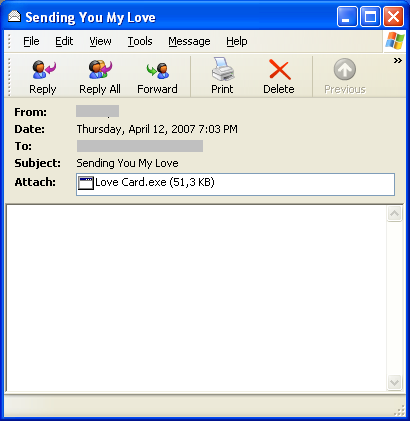
Email.Worm.Win32.Zhelatin.ct

Baru-baru ini pihak vendor antivirus F-Secure melalui webblognya menyatakan telah mendeteksi Trojan baru yang menyebar melalui email. Trojan ini menyerang khusus platform Windows dan akan mendrop banyak malware lainya ke komputer korban. belum banyak penjelasan yang beredar mengenai trojan ini.

Pertama kali Trojan ini terdeteksi di beberapa email yang terkesan romatis yang dengan beberapa subject seperti :
  • Sending You My Love
  • The Dance of Love
  • When I'm With You
  • A Dream is a Wish
  • A Is For Attitude
  • Eternal Love
  • Eternity of Your Love
  • Falling In Love with You
  • Hugging MyPillow
  • Inside My Heart
  • Kisses Through E-mail
  • Our Journey
  • Sent with Love
  • When Love Comes Knocking
  • You're In My Thoughts
  • You're the One

Zhelatin.CT

Di email ini tidak menyertakan pesan apapun juga hanya menyisipkan attachment berisi file EXE dengan nama-nama yang romatis seperti Love Card.exe , Love Postcard.exe , Greeting Card.exe atau Postcard.exe. Semua file executable ini terdeteksi sebagai Email-Worm.Win32.Zhelatin.ct.

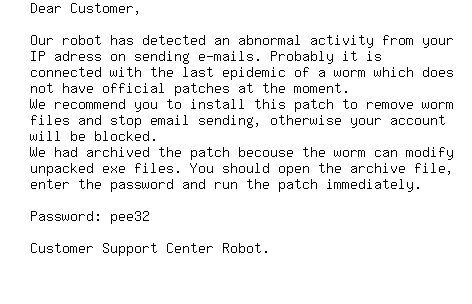
Penyebaran berikut terjadi beberapa jam kemudian setelah terdeteksi oleh vendor antivirus. kali ini dengan subject di email yang berbau-bau security seperti :
  • ATTN!
  • Spyware Alert!
  • Virus Alert!
  • Worm Alert!
  • Worm Detected!
Kali ini email bervirus ini menyertakan pesannya seolah-olah ada update security untuk komputer korbannya dan menyertakan password untuk membuka file attachmentnya seperti gambar dibawah ini :

Zhelatin.CT

Contoh File-file Attachment yang dikirim seperti :
  • patch-[4 atau 5 angka/huruf acak].zip
  • hotfix-[4 atau 5 angka/huruf acak].zip
Dimana semua file ZIP ini ketika di extract akan mengeluarkan file executable yang bernama Password-protected-EXE dan terdeteksi sebagai Email-Worm.Win32.Zhelatin.ct.


Setelah surf ke beberapa vendor antivirus ternyata worm ini di kenalin oleh Sophos dengan nama Troj/Dorf-B ... baca disini

Pembetulan untuk yang Advanced menurut Sophos adalah dengan cara menghapus registry di windows
HKLM\SYSTEM\CurrentControlSet\Services\wincom32 dan menghapus file Wincom32.sys di c:\windows\system32 atau mengunakan antivirus terupdate.

Berhati-hatilah jika anda menerima email tidak di kenal dengan subject seperti diatas , dan ingatlah untuk selalu mengupdate antivirus yang anda pakai.

Sumber : F-secure, Sophos, Viruslist,

Feb 5, 2007

Virus Brontok dan cara penangulangannya

Siapa yang tak kenal Brontok? Mungkin Anda semua sebagai pengguna komputer sudah sering mendengar informasi mengenai virus Brontok ini, atau bahkan komputer Anda sudah terinfeksi Brontok?

Belakangan ini, tampaknya varian baru Brontok ini semakin merajalela. Virus ini menggunakan USB Flash Disk sebagai media penyebarannya dan murni merupakan virus lokal Indonesia.Gejala komputer yang terkena virus ini otomatis akan sering restart sendiri , regedit tidak berfungsi, dan membuat banyak duplikat folder sesuai nama yg di tebenginya.

Setiap kali start Windows virus akan aktif di memory. Process name yang digunakan menyerupai nama-nama service di Windows, contohnya csrss.exe, lsass.exe, dan smss. exe, juga beberapa process dengan nama random. Apabila kita ingin meng-kill process tersebut dari Task Manager, sepertinya tidak bisa dilakukan, karena Brontok juga akan memblok akses ke Task Manager.

Belakangan juga terdeteksi telah beredar varian baru brontok yg di dinamai w32/RONTOKBRO.LA dimana penyebarannya langsung terjadi jika flashdisk ditancapkan ke PC/ Laptop tanpa perlu di klik,baca infonya di sini dan varian W32/BRONTOK.22 , baca detailnya di sini dimana virus ini masih bisa bereaksi walaupun komputer kita booting dalam kondisi safe-mode , ini disebabkan virus ini melakukan penambahan value pada beberapa section di registry yang dijadikan sebagai autorun. Salah satunya pada HKLM\SOFTWARE\Microsoft\Windows\CurrentVersion\Run. Dan juga menginfeksi value untuk run in safe-mode, yaitu pada HKLM\SYSTEM\CurrentControl-Set\Control\SafeBoot\AlternateShell, dengan mengalihkan nilai dari value tersebut ke program utama virus. inilah yang membuat virus ini masih aktif walau sudah di booting dalam modus safe-mode.

Selain pada registry,Virus ini juga megedit file hosts milik Windows. File hosts ini dipergunakan oleh Windows untuk me-resolve atau menerjemahkan hostname menjadi alamat IP. Yang dilakukan Brontok ini adalah dengan cara mengalihkan setiap IP dari hostname atau alamat situs Internet ke IP 127.0.0.22. Angka 22 pada IP tersebut menunjukan versi dari Brontok.


Schedule Task juga tak luput dari serangan Brontok, ia akan menambahkan dua item baru dengan nama AT1 dan AT2 yang akan menjalankan file \Documents and Settings\%username%\Local Settings\Application Data\jalak-%random%-bali.com setiap hari pada pukul 11:03 dan 17:08. Tak hanya itu, ia juga akan me-rename file Run-Time Library milik Visual Basic, yaitu MSVBVM60. DLL menjadi MSVBVM60.DLL.XXX, dimana XXX adalah nomor acak. Tujuannya adalah untuk mematikan virus-virus lain dan virus-virus Brontok versi lama yang masih menggunakan Visual Basic program. Namun, tindakan ini juga membuat aplikasi–aplikasi yang diprogram menggunakan Visual Basic tidak akan dapat berjalan.

Cara Membasmi Brontok

Yang saya lakukan untuk membasmi Varian Brontok ini adalah sebagai berikut:
  • Removal Brontok (Download dan bersihkan dalam kondisi boot safe-mode)
  • Hijackthis (Gunakan untuk membasmi autorun brontok yg terkunci)
  • ProcessExplorer ( sama kegunaan seperti Hijackthis)
  • Norman ( Download dan scan ulang semua Drive)
  • PC saya pulih kembali :)

Jan 16, 2007

W32/Rontokbro.LA Menginfeksi Komputer Dari Flashdisk Tanpa Perlu Diklik

Laptop kesayanganku kena Brontok akibat ditumpangin Flashdisk temen, hanya copy paste file ke dan dari flasdisk langsung restart terus dan muncul yg aneh aneh :(

Gue mulai Keluarin semua senjata perang mulai dari Antibrontok sampai bersihin registry dari unknow string , deteck *.exe/bat/com/pif/lnk/scr dan *.* from last modify akhirnya beres juga dan kembali normal laptopku tanpa perlu di format or install ulang .

Setelah itu coba akses ke detikinet.com , dapat satu artikel yang menambah pengetahuan , ternyata Varian Brontok sudah semakin canggih sehingga tanpa klik pun user bisa terjangkit virus tersebut.

Berikut kutipan artikel nya :

Varian Rontokbro Menginfeksi Tanpa Perlu Klik
Ni Ketut Susrini - detikInet

Jakarta, Biasanya virus akan aktif setelah file pembawanya dijalankan. Akan tetapi, varian terbaru Rontokbro bisa langsung aktif begitu flash disk ditancapkan ke komputer.

"Lagi-lagi Rontokbro menjadi pionir dalam mencari cara baru menginfeksi komputer," ujar Alfons Tanujaya, spesialis anti virus dari PT Vaksincom, melalui keterangan tertulis yang dikutip detikINET, Senin (15/1/2007).

Dinamai W32/Rontokbro.LA , varian ini mampu mengaktifkan dirinya secara otomatis setiap kali USB Flash Disk dicolokkan pada komputer. Padahal biasanya virus lokal baru akan aktif jika user melakukan klik ganda pada file yang sudah terinfeksi virus.

Menurut Alfons, kemampuan mengaktifkan diri sebelum klik ini ternyata sudah banyak dimiliki virus lokal yang ada, sebut saja virus W32/Askis, W32/VBWorm.ZL, VBWorm.MOS atau W32/Aksika. Alfons menilai teknik penyebaran ini merupakan suatu perkembangan yang luar biasa.

Rontokbro.LA, menurutnya, dibuat dengan menggunakan bahasa Visual Basic serta mengusung sebuah puisi cinta berjudul "4K51K4".

Aktif Tanpa Klik

Dijelaskan Alfons, agar file yang sudah dibuat di disket atau flash disk tersebut aktif secara otomatis tanpa harus dijalankan secara manual oleh user, virus ini akan membuat script pada disket atau flash disk tersebut dengan nama Desktop.ini. Script ini berisi perintah untuk menjalankan file Folder.htt. File Folder.htt ini berisi perintah lain untuk menjalankan file New Folder.exe.

"Jadi, setiap kali user mengakses disket atau flash disk yang sudah terinfeksi maka secara otomatis akan mengaktifkan virus tersebut," ujar Alfons.

Rontokbro.LA juga akan membuat file Desktop.ini di setiap drive (contoh: Drive C:\ atau D:\), sehingga jika user mengakses kedua drive tersebut maka secara otomatis akan mengaktifkan virus tersebut, tanpa harus menjalankan file yang sudah terinfeksi terlebih dahulu.

Source Sumber


Cara Membasmi Brontok W32/Rontokbro.LA

1. Putuskan connection komputer yang akan dibersihkan dari jaringan Server.

2. Matikan proses virus yang aktif dimemori. Sebagai informasi Rontokbro.LA akan aktif di mode "normal", "safe mode" maupun "safe mode with command prompt", file induk yang aktif di memori juga sangat sulit untuk dimatikan hal ini diperparah dengan kondisi dimana virus ini akan aktif setiap kali user menjalankan file Executable(EXE) dari suatu program , tools security seperti security task manager/proceeXP atau killbox pun dibuat tak berdaya.

Berita bagus untuk anda , Rontokbro.LA dibuat dengan menggunakan bahasa Visual Basic sehingga anda hanya perlu merubah file msvbvm60.dll yang ada didirektori C:\Windows dan C:\Windows\system32.
Untuk merubah file msvbvm60.dll tersebut, terlebih dahulu anda harus membuat Disket Startup karena file tersebut akan diubah pada mode DOS.

Setelah anda berhasil membuat disket Startup boting komputer melalui Disket, ketik di dos prompt di folder c:\Windows dengan perintah DIR/AH kemudian tekan tombol "Enter" pada keyboard [untuk melihat file yang disembunyikan], jika di direktori ini ditemukan file msvbvm60.DLL, ubah nama file tersebut dengan perintah REN MSVBVM60.DLL MSVBVM60
kemudian tekan tombol "Enter" pada keyboard.

Ubah juga file msvbvm60.dll yang ada di direktoriC:\Windows\system32, dengan mengunakan perintah yang sama seperti di atas.

Setelah file tersebut berhasil di ubah, restart komputer dan booting ke mode "Normal". Setelah komputer booting maka akan muncul beberapa pesan error, ini menandakan bahwa virus tersebut gagal untuk dijalankan [aktif] kerena tidak menemukan file msvbvm60.DLL

3. Hapus string registry yang dibuat oleh virus. Salin script dibawah ini pada program Notepad dan simpan dengan nama repair.inf kemudian jalankan dengan cara
  • klik kanan repair.inf
  • klik install

<- mulai copy dari sini ... ->

[Version]

Signature="$Chicago$"

Provider=Vaksincom

[DefaultInstall]

AddReg=UnhookRegKey

DelReg=del

[UnhookRegKey]
HKLM, Software\CLASSES\exefile\shell\open\command,,,"""%1"" %*"
HKLM, Software\CLASSES\batfile\shell\open\command,,,"""%1"" %*"
HKLM, Software\CLASSES\comfile\shell\open\command,,,"""%1"" %*"
HKLM, Software\CLASSES\exefile\shell\open\command,,,"""%1"" %*"
HKLM, Software\CLASSES\piffile\shell\open\command,,,"""%1"" %*"
HKLM, Software\CLASSES\regfile\shell\open\command,,,"regedit.exe "%1""
HKLM, Software\CLASSES\scrfile\shell\open\command,,,"""%1"" %*"
HKLM, SYSTEM\ControlSet001\Control\SafeBoot, AlternateShell,0, "cmd.exe"
HKLM, SYSTEM\ControlSet002\Control\SafeBoot, AlternateShell,0, "cmd.exe"
HKLM, SYSTEM\CurrentControlSet\Control\SafeBoot, AlternateShell,0, "cmd.exe"
HKLM, SOFTWARE\Microsoft\Windows NT\CurrentVersion\Winlogon, Shell,0, "Explorer.exe"
HKCU, Control Panel\International, s1159,0, "AM"
HKCU, Control Panel\International, s2359,0, "PM"
HKLM, SOFTWARE\Classes\exefile,,,"Application"
HKCU, Control Panel\Desktop,SCRNSAVE.EXE ,0,

[del]

HKCU, Software\Microsoft\Windows\CurrentVersion\Policies\System
HKCU, Software\Microsoft\Windows\CurrentVersion\Run, 4k51k4
HKCU, Software\Microsoft\Windows\CurrentVersion\Run, MSMSGS
HKCU, Software\Microsoft\Windows\CurrentVersion\Policies\Explorer, NoFolderOptions
HKLM, Software\Microsoft\Windows\CurrentVersion\Run, System Monitoring
HKLM, Software\Microsoft\Windows\CurrentVersion\Policies\Explorer, NoFolderOptions
HKLM, Software\Microsoft\Windows\CurrentVersion\Policies\System, DisableRegistryTools
HKLM, Software\Microsoft\Windows\CurrentVersion\Policies\System, DisableTaskMgr
HKLM, SOFTWARE\Policies\Microsoft\Windows NT\SystemRestore,DisableSR
HKLM, SOFTWARE\Policies\Microsoft\Windows NT\SystemRestore, DisableConfig
HKLM, SOFTWARE\Microsoft\Windows\CurrentVersion\Run, System Monitoring
HKLM, SOFTWARE\Microsoft\Windows\CurrentVersion\policies\system, DisableCMD
HKLM, SOFTWARE\Microsoft\Windows NT\CurrentVersion\Winlogon, LegalNoticeText
HKLM, SOFTWARE\Microsoft\Windows NT\CurrentVersion\Winlogon, LegalNoticeCaption
HKLM, SOFTWARE\Policies\Microsoft\Windows\Installer, LimitSystemRestoreCheckpointing
HKLM, SOFTWARE\Policies\Microsoft\Windows\Installer, DisableMSI
HKLM, SOFTWARE\Policies\Microsoft\Windows NT\SystemRestore, DisableConfig
HKLM, SOFTWARE\Policies\Microsoft\Windows NT\SystemRestore, DisableSR

<- Batas Copy disini ...->


4. Hapus file induk yang dibuat oleh virus , sebelum menghapus file tersebut pastikan anda sudah menampilkan file/folder yang disembunyikan dengan memilih option "Show hidden files and folders" dan menghilangkan pilihan "Hide extension for known file types" dan "Hide protected operating system files (recommended)" pada Folder Option.

Setelah itu hapus file induk berikut ini :
  • C:\Data%user%.exe [contoh: Data Admin.exe]
  • C:\4k51k4.exe
  • C:\Puisi.txt
  • C:\Desktop.ini
  • C:\4K51K4 , Folder ini berisi 2 buah file berikut:
  • Folder.htt
  • New Folder.exe
  • C:\Documents and Settings\%user%\Start Menu\Programs\Startup\startup.exe
  • C:\Documents and Settings\%user%\Local Settings\Application Data
  • 4k51k4.exe
  • csrss.exe
  • Empty.Pif
  • IExplorer.exe
  • lsass.exe
  • services.exe
  • shell.exe
  • winlogon.exe
  • C:\Documents and Settings\%user%\Local Settings\Application Data\WINDOWS
  • csrss.exe
  • lsass.exe
  • services.exe
  • smss.exe
  • winlogon.exe
  • C:\Documents and Settings\All Users\Start Menu\Programs\Startup
  • Empty.pif
  • Empty.exe
  • Startup.exe
  • C:\WINDOWS\4k51k4.exe

  • C:\WINDOWS\system32
  • Shell.exe
  • MrHelloween.scr
  • IExplorer.exe

Hapus juga file yang ada di Disket/Flash Disk:
  • 4K51K4 , di folder ini berisi 2 buah file dengan nama
  • Folder.htt
  • New Folder.exe
  • Data %user%.exe, contoh: Data Admin.exe
  • Desktop.ini
  • 5. Hapus file duplikat yang sudah dibuat oleh virus baik di Hard Disk maupun di Disket/Flash Disk dengan ciri-ciri :
  • Menggunakan icon folder
  • Ukuran 45 KB
  • Ext. exe
  • Type file "application"
  • 6. Untuk pembersihan optimal dan mencegah infeksi ulang scan dengan Norman Virus Control yang sudah dapat mengenali virus ini dengan baik.

    7. Jika komputer sudah bersih dari virus, tampilkan kembali file .EXE yang sudah disembunyikan. Gunakan perintah ATTRIB -s -h *.exe /s /dpada Dos Prompt. Sebagai informasi Rontokbro.LA juga akan mencoba untuk menyembunyikan file dengan ekst.Bat/Com/lnk/Pif jika file tersebut dijalankan oleh karena itu untuk menampilkan kembali file dengan ext tersebut gunakan perintah seperti diatas dengan mengganti ekstensi yang akan ditampilkan,
    contoh : "ATTRIB -s -h *.com /s /d"

    8. Ubah kembali file msvbvm60 yang ada di direktori C:\Windows\system32 menjadi msvbvm60.dll

    9. Restart ulang komputer dan anda sudah terbebas dari W32/Rontokbro.LA

    Thanks to mr. Aj Tau
    info@vaksin.com - PT. Vaksincom

    Sep 8, 2006

    How to protect your computer ?

    HOW YOU CAN GET INFECTED
    * Booting the computer from an infected hard disk, cd-rom or diskette.

    * Executing attached infected files (.exe, .com, .vbs, .dll, .sh, .bat , .scr, .pif and more) you may find inside emails.

    * Executing infected files (.exe, .com, .doc, .bat, .hlp, .htm, .ini, .js, .php, .pif, .reg, .ppt, .scr, .sh, .shs, .sys, .vbs, .wbt, .xls and more)

    * Previewing emails usually sent by an unknown person, because they possibly contain destructive code in the form of .html, that is automatically executed upon the email preview.

    * Browsing infected webpages (usually .htm and .html ).

    * Just by using the internet. To be more specific, almost every operating system, especially Microsoft Windows, have "security holes" which are exploited by a new type of viruses in order to infect the computer, without asking at ANY point the permission of the user to install any type of software.
    HOW TO PROTECT YOURSELF
    * Make a backup of your critical files regularly, after having scanned them with an antivirus program.

    * Update your antivirus program as often as possible.

    * Scan every file you download from the Internet.

    * If you use irc chat, make sure you have disabled the auto-accept-dcc-files option.

    * Try to have a real-time antivirus monitor while your computer is operating.

    * Don't visit every website you are invited to by an unknown person. It may contain a non-visible destructive applet.

    * Disable the execution of java or active-x scripts within your browser.

    * Unhide the hide-file-extension-of-known-filetypes option within your hard disk explorer. If someone sends you a file called pic.jpg.vbs, you may think it's a .jpg file and execute it!

    * Always have a boot disk for repairing your computer in case you get infected. Most antivirus programs offer this disk.

    * Try to use two different antivirus programs, using only one real-time monitor. Security is not a matter of money, it's a matter of life-and-death for your computer!

    * Use a firewall program (I recommend Sygate Personal Firewall -it has been discontinued but you can find its latest version at "www.virus.gr/sygate.zip"- or Outpost Firewall Free, which are absolutely FREE and manage to protect efficiently any personal computer - NOT to be used in corporate network).

    * Try to update the operating system of your computer often (especially Microsoft Windows), so that all known security holes are fixed. We should mention that certain Microsoft operating systems do NOT allow the user to install updates if they have not been purchased!
    WHAT YOU SHOULD DO IF YOU GET INFECTED
    * Avoid installing an antivirus program if you are sure you have been infected by a computer virus.

    * If your antivirus program detects the virus but cannot repair it, do NOT delete the file! Try using another antivirus program, maybe it will be able to repair the infected file. None of the antivirus programs is perfect, still, the difference among them may be huge!

    * Do NOT format your hard disk! Formatting is NEVER a 100% guaranteed solution in order to face a computer virus. Have patience, faith in the antivirus program you have chosen and ... a bit of good luck!

    Jul 27, 2006

    Benarkah ada Trojan baru di Firefox ?

    Baru-baru ini pihak security McAfee telah mengclaim mereka menemukan sebuah Trojan Horse, yang menyamar sebagai extension Mozilla Firefox. Mereka menamakan Trojan ini dengan "FormSpy". Lebih lanjut dikatakan Trojan ini akan bereaksi melalui komputer korban yang sudah terinfeksi dengan Trojan horse lain yang dikenal dengan "Downloader-AXM".

    Trojan Downloader-AXM ini akan mengirim perintah ke server untuk melakukan download program malicious/Trojan lain ke komputer korban tanpa si korban mengetahuinya layaknya sebuah layanan plugin firefox.

    Dan begitu sebuah Trojan baru terdownload, maka akan terinstall sendiri sebagai sebuah extentension baru diFirefox dan akan memonitoring aktifitas user selama surving di internet. Trojan ini terdeteksi sebagai extension bernama "NumberedLinks 0.9" yang secara normal akan mengijinkan user pengguna komputer untuk menavigasi linker website melalui nomor di keypad layaknya sebuah mouse.

    McAfee juga menyatakan trojan ini akan mentransfer semua data di web browser ke website lain termasuk nomor kartu kredit , nomor PIN Bank dan akan mencuri data email, ICQ Messenger, dan password FTP( File Transfer Protocol) . Berhati hatilah bagi pengguna firefox , jika anda menemukan extension tersebut maka segera di uninstall saja supaya aman dan jika firefox anda versi lama segeralah update dengan firefox terbaru.